
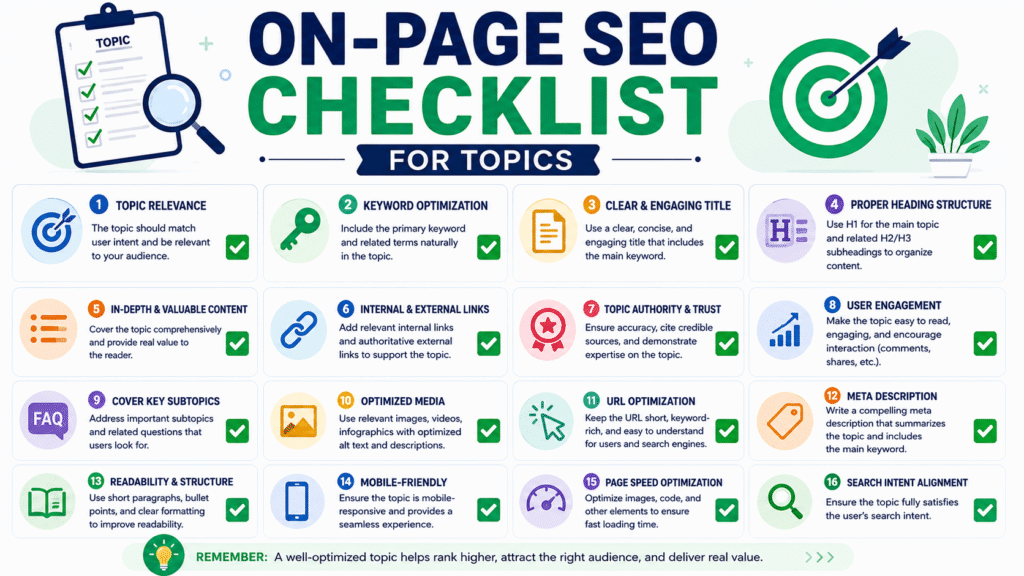
The Ultimate On-Page SEO Checklist: Drive Traffic and Rank
Imagine building a stunning, state-of-the-art school, but forgetting to put up a sign outside, mapping it on GPS, or clearing the road leading to the entrance. No matter how great the education inside is, no one will show up.
That is exactly what happens when you publish incredible content without On-Page SEO.
At Eduvish.com, we believe in making digital growth accessible to everyone. Whether you are a blogger, a small business owner, or an aspiring digital marketer, optimizing your website shouldn’t feel like learning rocket science.
This comprehensive, step-by-step On-Page SEO checklist will help you optimize your web pages so search engines can understand your content and reward you with higher rankings, more traffic, and better visibility.
What is On-Page SEO and Why Does It Matter?
Before we dive into the checklist, let’s break down the basics.
On-Page SEO (also known as on-site SEO) is the practice of optimizing individual web pages to rank higher and earn more relevant traffic in search engines. It refers to both the content and the HTML source code of a page that can be optimized, distinct from Off-Page SEO (which involves backlinks and external signals).
When search engines like Google send out “crawlers” or “spiders” to review your website, they look for specific cues to understand what your page is about. If your page is disorganized, slow, or missing key terms, Google will pass you over for a competitor who took the time to optimize.
The Golden Rule of Modern SEO: Optimize for humans first, and search engines second. If your users love your page, Google eventually will too.
Phase 2: Mastering Content & Readability
High-quality content is the foundation of all SEO. If your content is poorly written or unhelpful, users will hit the “back” button immediately. This behavior triggers a high “bounce rate,” signaling to Google that your page isn’t valuable.
Write a Compelling, Unbeatable Hook
The average human attention span online is shorter than that of a goldfish. You have roughly 3 to 5 seconds to convince a visitor to stay. Start your articles with an engaging question, a shocking statistic, or a bold promise that addresses their exact search intent.
Format for Scannability (The Skim Test)
Most online readers do not read word-for-word; they skim. If a user sees a massive wall of text, they will leave. Break your content down using:
- Short Paragraphs: Limit paragraphs to 2–3 sentences.
- Bullet Points and Numbered Lists: Ideal for breaking down steps or features.
- Bold and Italic Text: Use these to highlight critical takeaways so skimmers still get the core message.
Satisfy Search Intent Completely
Before writing, search your primary keyword on Google and see what the top 3 results are doing. Are they providing guides, lists, tools, or videos? Your content must match that format but offer more value, updated statistics, better examples, and clearer explanations. This is known as creating 10X Content.
Optimize Your Title Tag (H1)
Your title tag tells search engines what your page is about and dictates whether users click on your link.
- Keep it under 60 characters so it doesn’t get cut off in Google search results.
- Put your primary keyword near the beginning of the title.
- Use power words or numbers to boost your Click-Through Rate (CTR)
Use Heading Tags Correctly (H2, H3, H4)
Think of your heading tags as a book’s table of contents.
- H1: Use exactly one H1 tag per page for your main title.
- H2: Use these for your main subheadings (like the phases in this guide).
- H3 & H4: Use these for sub-points within your H2 sections.
Craft an Irresistible Meta Description
While meta descriptions do not directly impact Google’s ranking algorithms, they heavily influence whether a user clicks your link.
- Keep it between 150–160 characters.
- Include your primary keyword (Google bolds the keyword in search results if it matches the user’s query).
Visuals & Media Optimization
An all-text webpage is boring. Adding images, infographics, and videos keeps users engaged on your site longer, boosting your “dwell time”—a crucial ranking signal.
. Compress Images for Speed
High-resolution images can have massive file sizes that slow down your website. If a page takes more than 3 seconds to load, over half of your mobile visitors will abandon it.
- Use free image compression tools like Tiny PNG or Optimizilla before uploading images to your site.
Link to High-Authority External Sites
Don’t be afraid to link out to other websites. Linking to highly trusted, authoritative websites (like Wikipedia, Forbes, or official industry studies) proves to Google that you have done your research and want to provide the best resources for your readers. Aim for 2–4 high-quality external links per deep-dive post.
Prioritize Mobile-First Design
Well over 50% of global web traffic comes from mobile devices. Google uses mobile-first indexing, meaning it ranks your website based on how well it functions on a smartphone, not a desktop. Ensure your buttons are easy to tap, your font sizes are readable on a small screen, and your layout doesn’t break horizontally.
Maximize Page Load Speed
As mentioned earlier, speed is vital. Beyond compressing images, you can improve site speed by:
- Using a clean, fast-loading website theme.
- Enabling browser caching.
- Minifying clean HTML, CSS, and JavaScript code.
- Using a Content Delivery Network (CDN) if you serve a global audience.
Quick Reference Summary Table
| On-Page Element | Quick Best Practice Guide |
| Primary Keyword | Place in URL, Title Tag, H1, Meta Description, and first 100 words. |
| Title Tag Length | Keep it under 60 characters; start with your main keyword. |
| Meta Description | Keep it between 150–160 characters with a strong call-to-action. |
| URL Structure | Short, readable, lowercase, and separated by hyphens. |
| Heading Tags | Use exactly one H1 tag; organize sections with H2 and H3 tags. |
| Images | Compress under 100 KB and write clear, keyword-descriptive Alt Text. |
| Internal Linking | Link to 3–5 other relevant pages on your website per post. |
| Dwell Time Optimization | Write short paragraphs, use bullet points, and add relevant visuals. |
Final Thoughts: The Compound Effect of On-Page SEO
SEO is not a one-time project; it is a long-term strategy. Implementing these elements might seem like minor adjustments individually, but together they create a powerful compound effect. When your page is perfectly optimized, search engines can easily index your site, understand your value, and place you right in front of your ideal audience.
Bookmark this checklist on Eduvish.com, use it every time you hit “Publish,” and watch your search engine rankings climb to the top.
Conversation with Gemini
act as a expert content writer, you task is to provide a SEO friendly content for a website name eduvish.com for the topic “ON- PAGE SEO CHECKLIST”. The Output should have:
1. The content should be of 2000 words
2. The content should have high ranking keywords
3. The content should rank on google search engine
5. It should in easy language where it can be readable by normal person
6. Provide me top hashtags for the content social media post
7. write description for the social media post after completing the above task
The Ultimate On-Page SEO Checklist: Drive Traffic and Rank #1
Imagine building a stunning, state-of-the-art school, but forgetting to put up a sign outside, mapping it on GPS, or clearing the road leading to the entrance. No matter how great the education inside is, no one will show up.
That is exactly what happens when you publish incredible content without On-Page SEO.
At Eduvish.com, we believe in making digital growth accessible to everyone. Whether you are a blogger, a small business owner, or an aspiring digital marketer, optimizing your website shouldn’t feel like learning rocket science.
This comprehensive, step-by-step On-Page SEO checklist will help you optimize your web pages so search engines can understand your content and reward you with higher rankings, more traffic, and better visibility.
What is On-Page SEO and Why Does It Matter?
Before we dive into the checklist, let’s break down the basics.
On-Page SEO (also known as on-site SEO) is the practice of optimizing individual web pages to rank higher and earn more relevant traffic in search engines. It refers to both the content and the HTML source code of a page that can be optimized, distinct from Off-Page SEO (which involves backlinks and external signals).
When search engines like Google send out “crawlers” or “spiders” to review your website, they look for specific cues to understand what your page is about. If your page is disorganized, slow, or missing key terms, Google will pass you over for a competitor who took the time to optimize.
The Golden Rule of Modern SEO: Optimize for humans first, and search engines second. If your users love your page, Google eventually will too.
Phase 1: Keyword Research & Master Placement
Keywords are the bridge between what people are searching for and the content you are providing to fill that need. You cannot start on-page optimization without knowing your target keywords.
1. Identify One Primary Keyword per Page
Every page on your website should target one primary search intent. If you try to target “best digital marketing courses” and “how to bake a cake” on the same page, Google will get confused, and your rankings will suffer.
- Tip: Use free or paid tools (like Google Keyword Planner, Ahrefs, or Ubersuggest) to find a high-volume, low-competition primary keyword.
2. Gather 3–5 Secondary (LSI) Keywords
Latent Semantic Indexing (LSI) keywords are simply words and phrases closely related to your main topic. For example, if your primary keyword is “On-Page SEO Checklist,” your secondary keywords might include:
- Search engine optimization tips
- SEO content strategy
- Website ranking factors
- How to improve Google rankings
3. Place Keywords in Strategic Zones
Do not just stuff your keyword everywhere (Google penalizes “keyword stuffing” because it ruins the reading experience). Instead, place your primary keyword naturally in these five critical areas:
- The first 100 words: Tell the reader (and Google) immediately what the page is about.
- The Title Tag: The main headline that appears on Google search results.
- The H1 and at least one H2 Tag: The structural headings of your page.
- The URL: Keep it short and keyword-rich.
- The Meta Description: The brief summary below your Google search result link.
Phase 2: Mastering Content & Readability
High-quality content is the foundation of all SEO. If your content is poorly written or unhelpful, users will hit the “back” button immediately. This behavior triggers a high “bounce rate,” signaling to Google that your page isn’t valuable.
4. Write a Compelling, Unbeatable Hook
The average human attention span online is shorter than that of a goldfish. You have roughly 3 to 5 seconds to convince a visitor to stay. Start your articles with an engaging question, a shocking statistic, or a bold promise that addresses their exact search intent.
5. Format for Scannability (The Skim Test)
Most online readers do not read word-for-word; they skim. If a user sees a massive wall of text, they will leave. Break your content down using:
- Short Paragraphs: Limit paragraphs to 2–3 sentences.
- Bullet Points and Numbered Lists: Ideal for breaking down steps or features.
- Bold and Italic Text: Use these to highlight critical takeaways so skimmers still get the core message.
6. Satisfy Search Intent Completely
Before writing, search your primary keyword on Google and see what the top 3 results are doing. Are they providing guides, lists, tools, or videos? Your content must match that format but offer more value, updated statistics, better examples, and clearer explanations. This is known as creating 10X Content.
Phase 3: HTML & Technical On-Page Elements
This is where we fine-tune the backend structural elements of your webpage to ensure search engine algorithms index your site accurately.
[Your Web Page Title] <-- Max 60 Characters (Include Primary Keyword)
       |
[H1: Main Headline] <-- Only One Per Page
       |
[H2: Major Sections] <-- Break down your topics
       |
[H3: Sub-points] <-- Further breakdown of H2 topics
7. Optimize Your Title Tag (H1)
Your title tag tells search engines what your page is about and dictates whether users click on your link.
- Keep it under 60 characters so it doesn’t get cut off in Google search results.
- Put your primary keyword near the beginning of the title.
- Use power words or numbers to boost your Click-Through Rate (CTR) (e.g., “Ultimate Guide,” “Step-by-Step,” “In 2026”).
8. Use Heading Tags Correctly (H2, H3, H4)
Think of your heading tags as a book’s table of contents.
- H1: Use exactly one H1 tag per page for your main title.
- H2: Use these for your main subheadings (like the phases in this guide).
- H3 & H4: Use these for sub-points within your H2 sections.
9. Craft an Irresistible Meta Description
While meta descriptions do not directly impact Google’s ranking algorithms, they heavily influence whether a user clicks your link.
- Keep it between 150–160 characters.
- Include your primary keyword (Google bolds the keyword in search results if it matches the user’s query).
- Include a clear Call to Action (CTA) like “Read more,” “Download the checklist,” or “Learn how today.”
10. Clean Up Your URL Structure
A clean, readable URL is a minor ranking factor and builds user trust. Which link looks more trustworthy to you?
- Option A:
eduvish.com/p=12345-xyz-abc - Option B:
eduvish.com/on-page-seo-checklist
Always choose Option B. Keep it short, use lowercase letters, use hyphens to separate words, and remove filler words like “and,” “the,” or “a.”
Phase 4: Visuals & Media Optimization
An all-text webpage is boring. Adding images, infographics, and videos keeps users engaged on your site longer, boosting your “dwell time”—a crucial ranking signal.
11. Implement Image Alt Text
Search engines are incredibly smart, but they cannot “see” images the way humans do. They rely on Alt Text (alternative text) to understand what an image represents.
- Write descriptive alt text for every image. Instead of naming an image
IMG_8473.jpg, usealt="step by step on page seo checklist infographic". - This also ensures your website is accessible to visually impaired users using screen readers and helps your images rank in Google Images search.
12. Compress Images for Speed
High-resolution images can have massive file sizes that slow down your website. If a page takes more than 3 seconds to load, over half of your mobile visitors will abandon it.
- Use free image compression tools like TinyPNG or Optimizilla before uploading images to your site.
- Aim to keep image file sizes under 100 KB whenever possible.
Phase 5: Link Architecture (Internal & External)
The web is built on links. The way you link out to others and connect your own pages tells Google how authoritative and well-organized your website is.
                        [ Your New Blog Post ]
                             /          \
                            /            \
              (Internal Link)            (External Link)
                          /                \
                         v                  v
         [ Older Related Article ]     [ High-Authority Source ]
         (Keeps users on your site)     (Builds trust with Google)
13. Master the Art of Internal Linking
Internal links are hyperlinks that point to another page on the same website.
- When you publish a new article, link to 3–5 of your older, relevant blog posts.
- Go back to those older posts and add a link to your new article.
- Why it matters: It spreads “link equity” (ranking power) across your site and guides readers deeper into your content funnel.
14. Link to High-Authority External Sites
Don’t be afraid to link out to other websites. Linking to highly trusted, authoritative websites (like Wikipedia, Forbes, or official industry studies) proves to Google that you have done your research and want to provide the best resources for your readers. Aim for 2–4 high-quality external links per deep-dive post.
Phase 6: User Experience (UX) & Technical Alignment
You can have perfect keywords, but if your website feels broken or dangerous, no one will stay. This phase covers the technical side of your on-page presentation.
15. Prioritize Mobile-First Design
Well over 50% of global web traffic comes from mobile devices. Google uses mobile-first indexing, meaning it ranks your website based on how well it functions on a smartphone, not a desktop. Ensure your buttons are easy to tap, your font sizes are readable on a small screen, and your layout doesn’t break horizontally.
16. Secure Your Site with HTTPS
User safety is a non-negotiable priority for search engines. If your website URL starts with http:// instead of https://, Google will mark your site as “Not Secure” to visitors. Ensure you have an active SSL certificate installed through your hosting provider.
17. Maximize Page Load Speed
As mentioned earlier, speed is vital. Beyond compressing images, you can improve site speed by:
- Using a clean, fast-loading website theme.
- Enabling browser caching.
- Minifying clean HTML, CSS, and JavaScript code.
- Using a Content Delivery Network (CDN) if you serve a global audience.
Quick Reference Summary Table
| On-Page Element | Quick Best Practice Guide |
|---|---|
| Primary Keyword | Place in URL, Title Tag, H1, Meta Description, and first 100 words. |
| Title Tag Length | Keep it under 60 characters; start with your main keyword. |
| Meta Description | Keep it between 150–160 characters with a strong call-to-action. |
| URL Structure | Short, readable, lowercase, and separated by hyphens. |
| Heading Tags | Use exactly one H1 tag; organize sections with H2 and H3 tags. |
| Images | Compress under 100 KB and write clear, keyword-descriptive Alt Text. |
| Internal Linking | Link to 3–5 other relevant pages on your website per post. |
| Dwell Time Optimization | Write short paragraphs, use bullet points, and add relevant visuals. |
Final Thoughts: The Compound Effect of On-Page SEO
SEO is not a one-time project; it is a long-term strategy. Implementing these elements might seem like minor adjustments individually, but together they create a powerful compound effect. When your page is perfectly optimized, search engines can easily index your site, understand your value, and place you right in front of your ideal audience.
Bookmark this checklist on Eduvish.com, use it every time you hit “Publish,” and watch your search engine rankings climb to the top.
Social Media Post Assets
To maximize the reach of this piece, use the pre-optimized social media assets below across your brand acc
Social Media Post Description
Want more free organic traffic to your website but don’t know where to start?
Writing great content is only half the battle. If you aren’t optimizing your pages for search engines, your target audience will never find you!
We just published The Ultimate On-Page SEO Checklist on Eduvish.com to take the guesswork out of ranking on Google. Whether you are a complete beginner or looking to brush up on your skills, this step-by-step guide covers everything you need to know: