
Introducation
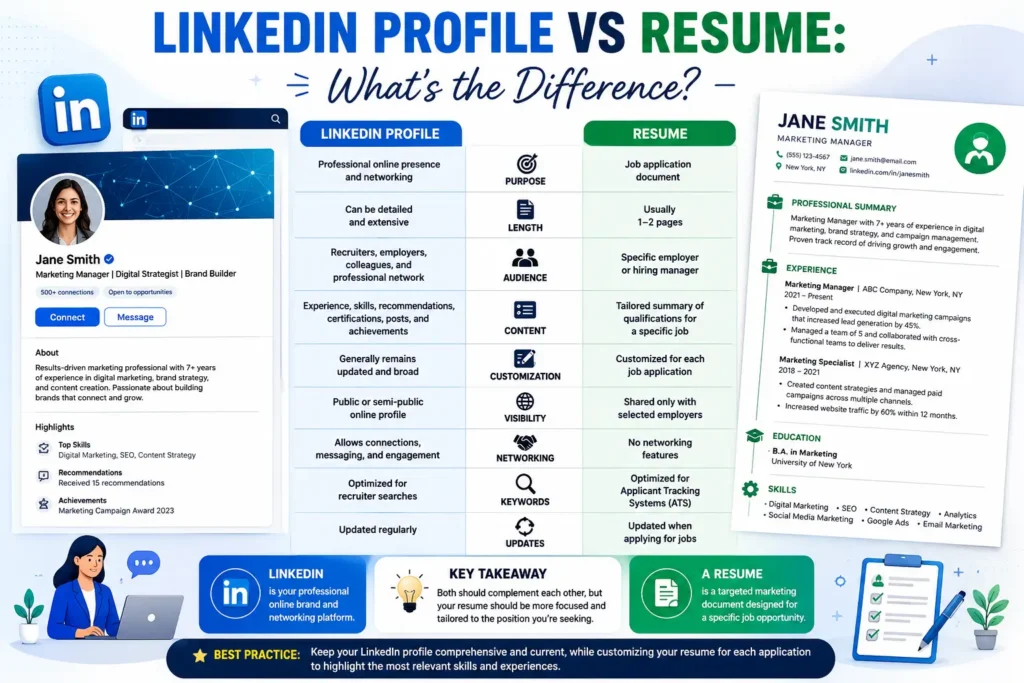
In today’s digital world, both your LinkedIn profile and resume play a vital role in shaping your professional identity. While they may seem similar, each serves a unique purpose in your career journey. Understanding the difference between the two can help you present yourself effectively to recruiters and employers.
This guide will explain the key differences between a LinkedIn profile and a resume, how to optimize both, and why you need them to succeed in the modern job market.
1. Understanding the Basics
Before diving into the differences, let’s define each one clearly.
| Aspect | LinkedIn Profile | Resume |
|---|---|---|
| Format | Online, interactive profile | Static document (PDF/Word) |
| Purpose | Networking and professional branding | Applying for specific jobs |
| Length | Can be detailed | Usually one or two pages |
| Audience | Public (recruiters, peers, professionals) | Private (specific employers) |
| Tone | Conversational and engaging | Formal and concise |
SEO Keywords: LinkedIn vs resume, difference between LinkedIn and resume, LinkedIn profile tips, resume writing guide
2. Purpose and Function
- LinkedIn Profile: Acts as your digital portfolio. It helps you connect with professionals, showcase achievements, and attract recruiters.
- Resume: A targeted document tailored for a specific job application. It highlights relevant skills and experiences for that role.
Example: Your LinkedIn profile might include all your internships, volunteer work, and certifications, while your resume focuses only on experiences relevant to the job you’re applying for.
3. Content and Structure
LinkedIn Profile:
- Includes a headline, summary, experience, skills, recommendations, and accomplishments.
- Allows multimedia attachments like videos, links, and portfolios.
Resume:
- Includes contact information, objective, education, experience, skills, and achievements.
- Focuses on concise bullet points and measurable results.
SEO Keywords: LinkedIn profile structure, resume format for professionals, how to write LinkedIn summary
4. Tone and Style
- LinkedIn: More conversational and personal. You can use first-person language (“I led a team…”).
- Resume: Formal and impersonal. Avoid pronouns and keep sentences short (“Led a team of five…”).
Tip: Use storytelling on LinkedIn and precision on your resume.
5. Length and Detail
- LinkedIn: You can include all experiences, even minor projects or volunteer work.
- Resume: Keep it short — ideally one page for freshers and two for experienced professionals.
SEO Keywords: resume length tips, LinkedIn optimization for job seekers, professional branding online
6. Customization
- LinkedIn: One profile for all audiences.
- Resume: Customize for each job application.
Example: If you’re applying for a marketing role, your resume should emphasize marketing projects, while your LinkedIn can still include your teaching or volunteering experiences.
7. Visibility
- LinkedIn: Public and searchable by recruiters.
- Resume: Shared privately during job applications.
Tip: Keep your LinkedIn profile updated and visible to “Open to Work” to attract opportunities.
8. Design and Presentation
- LinkedIn: Uses a standard layout with sections and visuals.
- Resume: You can design it creatively using templates, colors, and fonts.
SEO Keywords: resume design tips, LinkedIn profile layout, professional resume format
9. Networking Opportunities
LinkedIn allows you to:
- Connect with professionals and alumni.
- Join industry groups.
- Share posts and articles.
- Receive endorsements and recommendations.
Your resume, however, doesn’t offer networking — it’s a one-way communication tool.
10. Recommendations and Endorsements
LinkedIn lets others endorse your skills and write recommendations. Resumes don’t include endorsements but may list references separately.
Tip: Ask mentors or colleagues to endorse your skills on LinkedIn to boost credibility.
11. Keywords and SEO
LinkedIn profiles are indexed by search engines, so keywords help recruiters find you. Resumes use keywords to pass ATS (Applicant Tracking Systems).
SEO Keywords: LinkedIn SEO tips, resume keywords for ATS, job search optimization
12. Updating Frequency
- LinkedIn: Update regularly with new achievements, posts, and certifications.
- Resume: Update only when applying for jobs or after major milestones.
Tip: Sync your resume updates with your LinkedIn profile for consistency.
13. Multimedia and Visuals
LinkedIn allows you to upload videos, presentations, and portfolios. Resumes are text-based, though you can include links to your LinkedIn or portfolio.
SEO Keywords: LinkedIn multimedia portfolio, resume links examples, digital resume tips
14. Professional Branding
Your LinkedIn profile builds your personal brand through posts, articles, and engagement. Your resume builds your professional image through achievements and skills.
Tip: Use both strategically — LinkedIn for visibility, resume for precision.
15. How LinkedIn and Resume Work Together
- Use your LinkedIn profile to attract recruiters.
- Use your resume to apply for specific roles.
- Ensure both have consistent information (dates, job titles, achievements).
Example: Your LinkedIn headline might say “Marketing Student | Content Creator | SEO Enthusiast,” while your resume objective could read “Seeking a marketing role to apply my SEO and content creation skills.”
16. Common Mistakes to Avoid
- Copying your resume word-for-word onto LinkedIn.
- Using inconsistent job titles or dates.
- Leaving your LinkedIn profile incomplete.
- Forgetting to include keywords.
SEO Keywords: LinkedIn mistakes to avoid, resume writing errors, job search tips for students
17. How to Optimize Both
LinkedIn Optimization:
- Write a strong headline and summary.
- Add a professional photo.
- Include keywords relevant to your industry.
- Engage with posts and share insights.
Resume Optimization:
- Use action verbs and measurable results.
- Tailor content for each job.
- Keep formatting clean and professional.
18. Example Comparison
| Section | LinkedIn Profile | Resume | |||
|---|---|---|---|---|---|
| Headline | “Aspiring Data Analyst | Python | Excel | Power BI” | “Data Analyst Intern” |
| Summary | “I’m passionate about turning data into insights…” | “Seeking a data analyst role to apply analytical skills.” | |||
| Experience | Detailed descriptions with links and media | Concise bullet points | |||
| Skills | Endorsed by peers | Listed with proficiency levels |
19. Which One Is More Important?
Both are equally important.
- LinkedIn helps you get discovered.
- Resume helps you get hired.
Together, they form a complete professional profile.
Conclusion
Your LinkedIn profile and resume are two sides of the same coin. While your resume is a formal document tailored for job applications, your LinkedIn profile is a dynamic platform for networking and personal branding.
Keep both updated, consistent, and optimized with relevant keywords to maximize your visibility and career opportunities.
Remember: Your resume gets you interviews, but your LinkedIn profile gets you noticed.